
Taxonomy
Build an AI-powered product taxonomy to automatically categorize and label your customer signals. Paste your docs, get a 4-level hierarchy, and let AI auto-label everything.


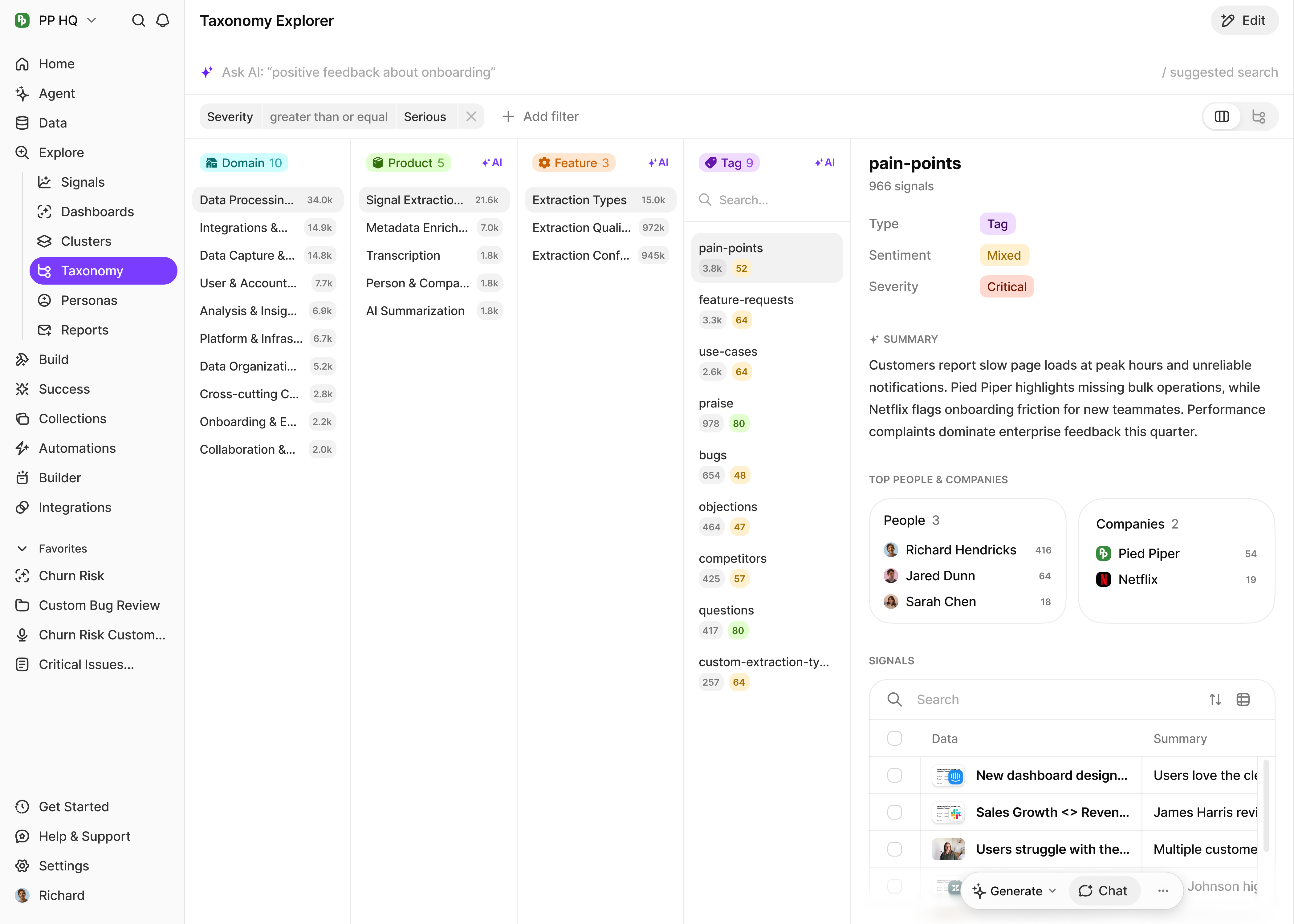
Organize your signals automatically
Stop manually categorizing feedback. Build your product taxonomy and let AI auto-label every signal.


4-Level Hierarchy
Domain, Product, Feature, and Tag levels that mirror how your product is actually structured.

AI Auto-Labeling
AI labels incoming signals to the right Product, Feature, and Tag. Run in backfill or overwrite mode.

Generate from Docs
Paste your product documentation and AI generates your entire taxonomy tree. Then refine from there.

Custom Labeling Instructions
Add descriptions and instructions to any node so the auto-labeler handles ambiguous features correctly.
Watch our quick tour
The 4-level hierarchy
Domains organize at the top. Products, Features, and Tags are auto-labeled by AI.
Level 1

Manual

Domain
High-level product area or customer journey
Manual


Level 2

Auto-labeled

Product
Specific offering, module, or major feature set
Auto-labeled


Level 3
Auto-labeled

Feature
Individual capability or functionality
Auto-labeled
Level 4
Auto-labeled

Tag
Specific scenario, variation, or fine-grained label
Auto-labeled
How it works
Paste your docs
Feed in product documentation, feature lists, help docs, or release notes. AI extracts a full 4-level hierarchy.

Refine the tree
Review in the Taxonomy Editor. Rename nodes, add missing features, edit AI labeling instructions, drag to reorder.

Auto-label signals
AI labels every incoming signal. Backfill existing data or overwrite previous labels. See signal counts per node.

Taxonomy vs Custom Tags
Use taxonomy for product categorization. Use custom tags for cross-cutting concerns like "urgent", "competitor mention", or "follow-up needed".
Taxonomy
Custom Tags
Hierarchical (4 levels)
Flat list
AI-generated structure
Manually created
Auto-applied to signals
Manually applied
Product-focused
Flexible use cases
Best practices

Start broad, then refine — begin with major product areas and add detail over time
Use your customers' language — name nodes using terms customers actually use
Add descriptions to ambiguous features so AI labels them correctly
Review periodically as your product evolves — add new features, retire old ones
Don't over-categorize — focus on distinctions that matter for analysis

Works with Clusters
Combine taxonomy with AI-generated clusters for the best of both worlds. Structured categorization for known product areas, plus AI discovery of emerging themes.
What's next
Signals
Auto-label every signal to your taxonomy
Feedback Collection
Organize feedback with structured categorization
Custom Context
Tell BuildBetter about your company, products, and services. Every extraction, every analysis, every report is personalized to your business.
Company Context
Define who you are, what you do, and how you operate. Your agent understands your business model and industry.
Products & Services
Describe your offerings in detail. Your agent knows what you sell, features, pricing tiers, and positioning.
Embedded Intelligence
Custom context is woven into every extraction. Your agent speaks your language and understands your world.
Always Applied
Unlike one-off prompts, custom context persists. It's applied to every analysis, report, and conversation.
Organize at scale
