


Free · Works 100% offline
Record every call.Bot or no bot.
Local video and audio of Zoom, Google Meet, and Teams calls with no bot on the call. Bring in the BuildBetter bot whenever you want one. Dictation and screen recording are built in. Free on Mac, Windows, iPhone, and Android.

Mac · Windows · iPhone · Android · Plaud · Compare to Others
Bot or no bot
The only recorder that does both
Record locally, let a bot join, or switch between them mid-call. Every recording ends up in the same place.
Video and audio, no bot
Records Zoom, Google Meet, and Microsoft Teams with full video and audio on your computer. Nobody sees a bot join.
Hand off to the bot
Let the BuildBetter bot in and your local recording keeps going. Follow the bot's live transcript right in the app.
Pause and resume
Someone asks you to stop recording, or something sensitive is on screen? Pause the bot or the local recording, then resume in the same recording.
Late? Catch up
Joining a call someone else is already recording, by bot or locally? You get the transcript so far. No need to ask for a recap.
Starts and stops on its own
Detects meetings on Mac and Windows and records them automatically. Started one by hand? Link it to the right meeting afterwards.
100% local when you want it
No internet, no account, no problem. Record and transcribe on your device, then upload to BuildBetter later if you want.
Three products, one app
Record, dictate, and capture
Use any combination. A meeting note-taker, a voice-to-text engine, and a screen recorder — sharing the same local models, hotkeys, and library.
Meeting Recorder
No bot required.
Records video and system audio straight from your computer, turns your notes into summaries, and links every recording to your calendar.
Dictation
Speak in any app.
A hotkey-driven dictation bar and notch UI turn your voice into clean text in any text field. Cleanup is optional, local, and yours to tune.
Screen Recording
Capture your screen.
Pick a window or full display, record with system audio, and save or share. Powered by ScreenCaptureKit on macOS, no external service required.
Organized for you
Your calls sort themselves
Series, collections, and workflows do the filing. Search and AI chat find what you need.
Series
Recurring meetings are grouped into a Series automatically. Ask questions across every 1:1 or weekly sync at once.
Every recurring meeting lands in its own Series. No setup, no tagging.
Workflows
New recordings in a Series can be added to a collection, posted to Slack, or turned into a Notion page, all without you lifting a finger.
Collections
Personal, shared, and workspace collections, plus local folders when you're signed out.
Instant search
Local search across recordings, transcripts, people, and companies returns results in seconds.
Chat with any call
Ask one call, a whole Series, or your workspace. Use BuildBetter's models, your own API keys, or a local model.
Templates
Summary templates come straight from your BuildBetter workspace, and they work locally too.
Every device you use
The same local-first recorder on desktop and mobile, with or without a BuildBetter account.
Mac
Notch mode or floating bar. Local video, audio, screen recording, and dictation.
Windows
Floating bar, automatic meeting detection, local video and audio, and dictation. Updates itself automatically.
iPhone
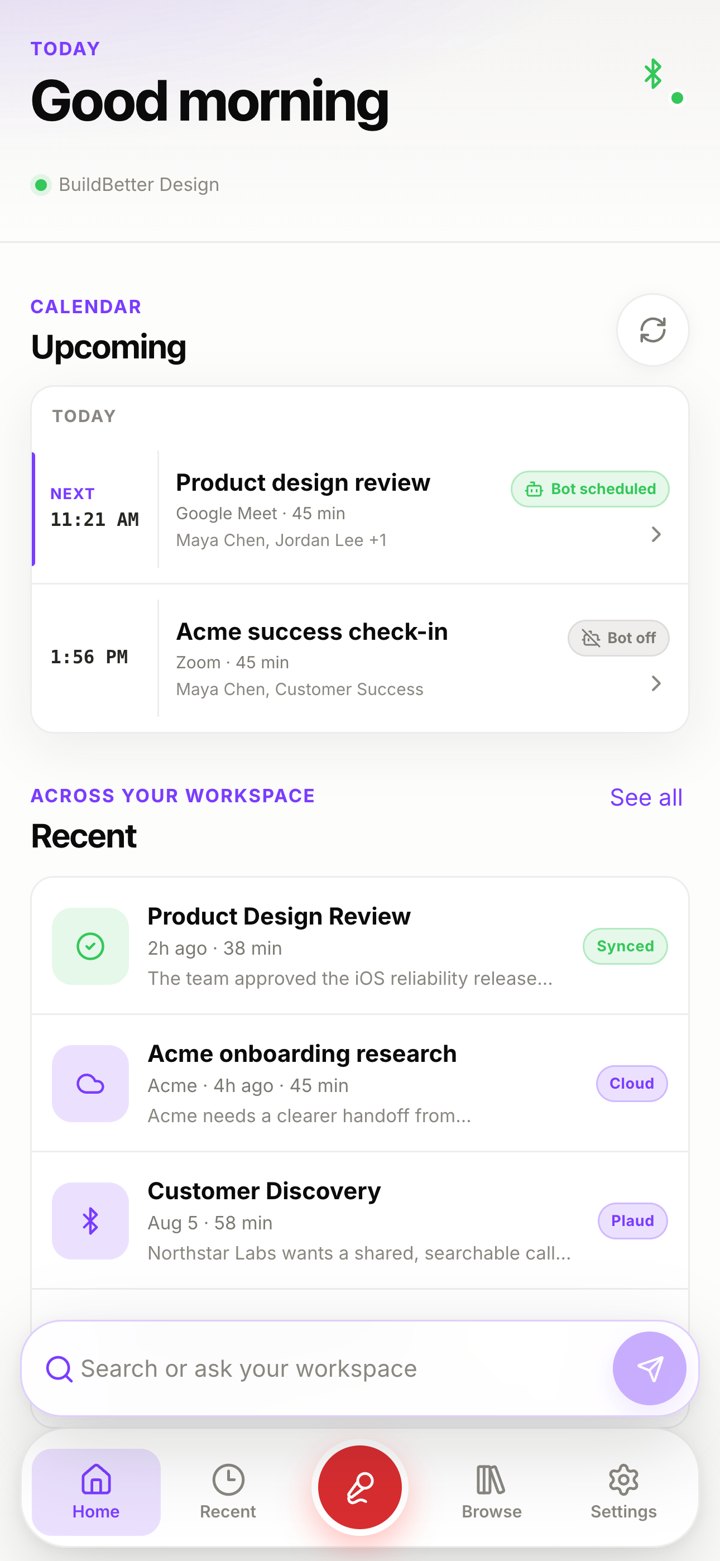
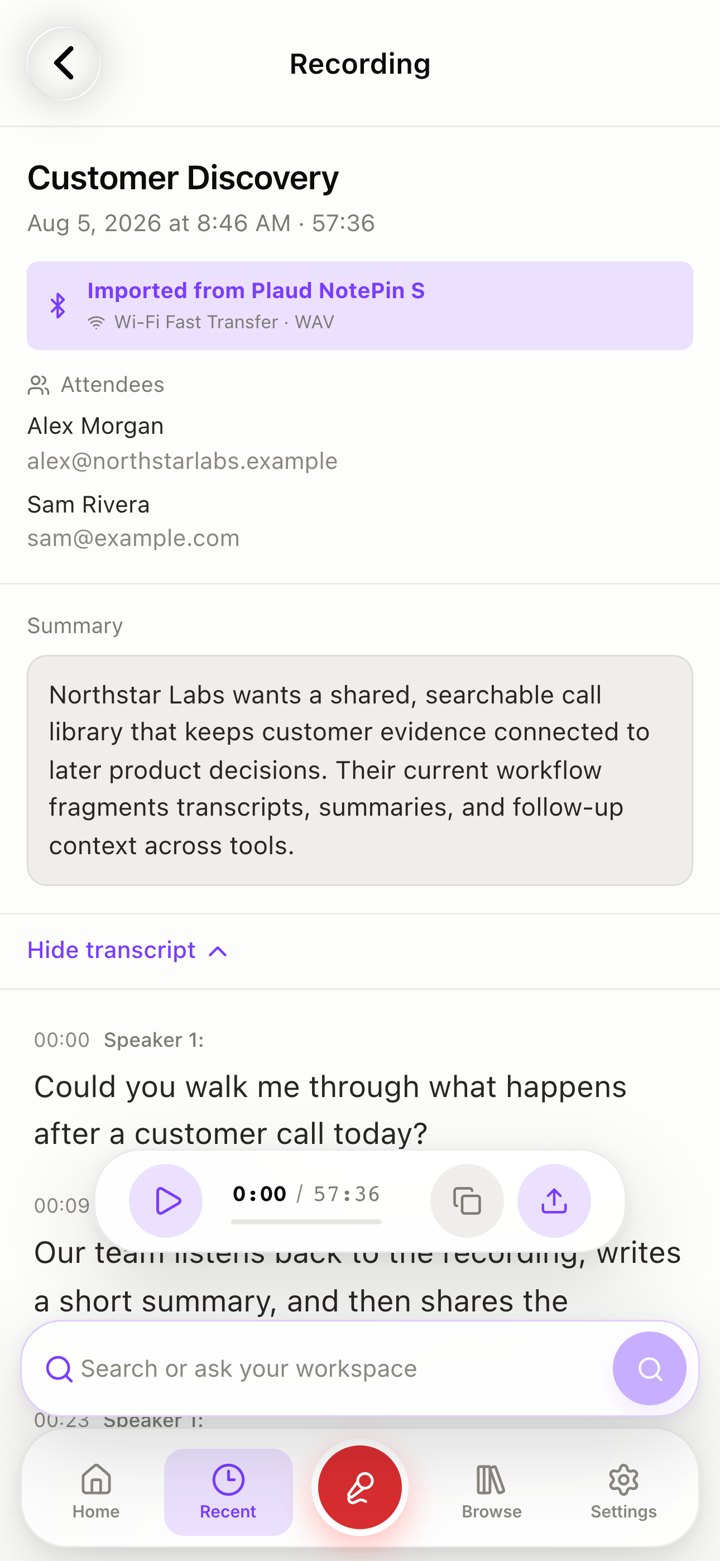
On-device transcription and AI chat. Connect a Plaud recorder to import over Bluetooth or Wi-Fi and sync new recordings automatically.
Android
Live transcription on the device or through BuildBetter. Plaud recorders can be connected and imported too.
Signed in to BuildBetter? Every call, bot or no bot, is on your phone too, with the full transcript.
BB Recorder vs. Granola
Why people switch from Granola

Record from anywhere
Traveling or stuck on your phone? Send the BuildBetter bot and the call still gets recorded and transcribed, no laptop needed. Granola has no bot, so it only captures what your own device can hear.
Keep the recording
Granola keeps no audio or video. BB Recorder keeps both, so you can play back the call and share the moment that matters.
Bot and no bot
Granola only records without a bot. BB Recorder does both and hands off between them mid-call.
Truly local and free
Granola needs an account and its cloud. BB Recorder runs 100% on your device, free, with no account.
More than meeting notes
Dictation, screen recording, Plaud recorders, and Series with workflows, all in one app.
BB Recorder + BuildBetter
Even better signed in to BuildBetter
You never need an account to use BB Recorder. Sign in and you also get BuildBetter's transcription, AI agent chat, a calendar managed for you, Series and workflows shared with your team, and SOC 2 and HIPAA-compliant storage.
Try it on your next call.
Free. Works offline. No account required.
Rolling it out to a team? BuildBetter adds SSO, admin controls, and a shared workspace.
